I spend a lot of time at a keyboard.
That is especially true during the workday, but the part I was trying to solve happens afterward. I still want to work on websites, research something, mess with code, brainstorm ideas, or work on personal projects. After typing all day, sometimes I do not feel like spending the rest of the evening doing more of the same.
I had used Wispr Flow before and liked voice dictation as a workflow. What I did not really want was another subscription, or another free plan where I had to keep usage limits in the back of my mind.
So I started looking at free and open-source options to see how much of this I could run locally on my own computer.
That search led me to OpenWhispr.
I have a working setup now and have started using it in my normal personal workflow. I am still testing different models, so this is not a “here is the one perfect setup” post. It is what I am running right now, why I chose it, what has worked, and what I have already found that needs some adjustment.
I liked voice dictation, just not another subscription
Voice dictation already made sense to me.
If I am writing a message, asking an AI tool a question, or trying to work through an idea, speaking can sometimes feel more natural than stopping to type the whole thing out. It also gives me another way to keep working on personal projects after spending the workday at a keyboard. Wispr Flow showed me that I liked that kind of workflow.
The sticking point was the cost model. It was not really about one service being outrageously expensive. I just did not want another recurring subscription for something I thought might be possible to run on hardware I already own. A free plan with usage limits did not completely solve that either. That is what pushed me toward local dictation.
Can I just run this on my own PC?
After looking through free and open-source dictation software, I found OpenWhispr. The workflow I ended up with has two main pieces. First, a speech-to-text model handles what I say. Then a separate local AI model can clean up the transcription before I paste it into whatever I am working on.
My current setup is:
Speech-to-text: NVIDIA Nemotron Speech Streaming EN 0.6B
Cleanup model: Gemma 3 4B
I am running it on a Windows PC with:
Intel Core i7-8700 @ 3.20 GHz
64 GB DDR4 RAM
NVIDIA GeForce RTX 3080
The software itself was not the hard part. Picking the models was! OpenWhispr gives you multiple speech-to-text models and multiple local AI models. Once I started looking through them, it turned into information overload pretty quickly.
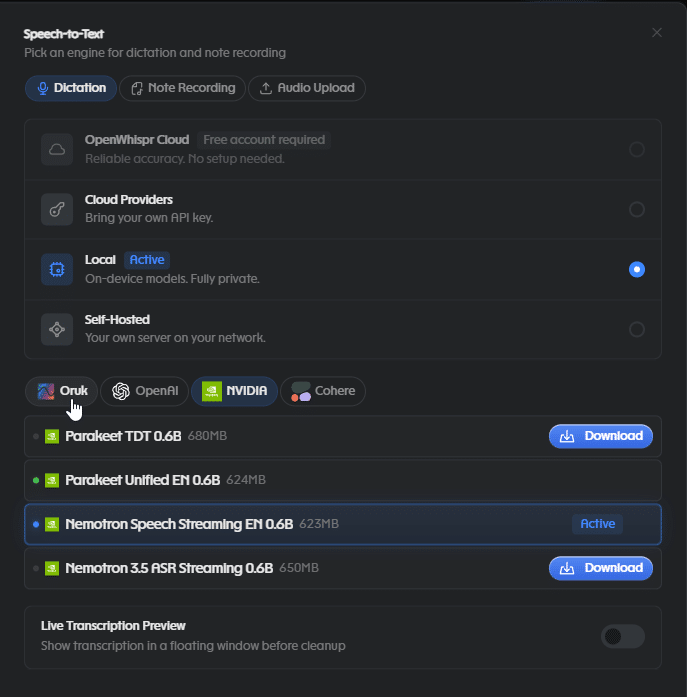
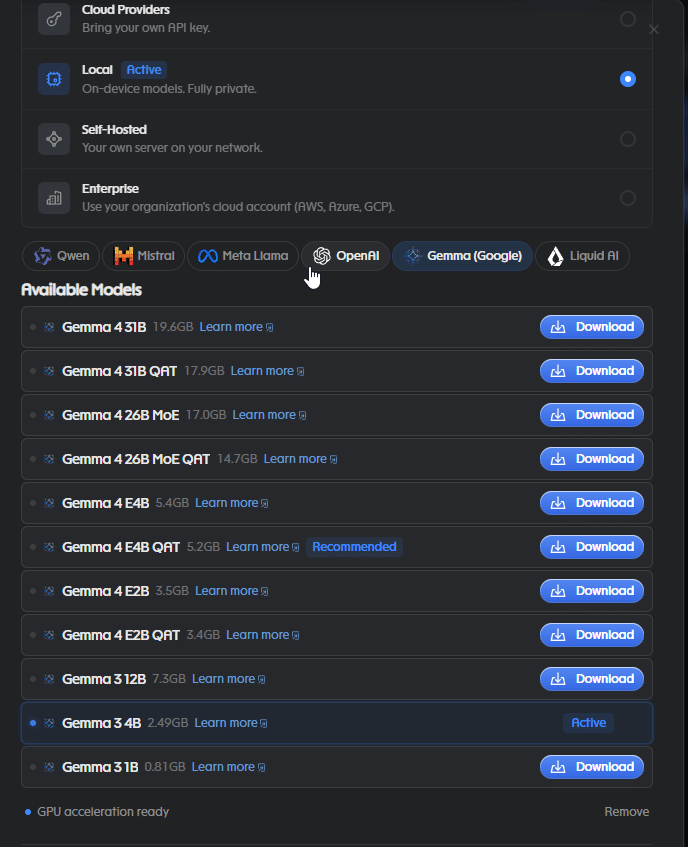
I know enough about AI to be dangerous, but I was not interested in spending hours manually researching every individual model. I used AI Subagents within ChatGPT and a local Open Source Project AI – Hermes, to help with research assistance to narrow the list, then checked model documentation, provider-published benchmarks, OpenWhispr’s GitHub source, and the available details about how the models were intended to work. That helped me get to a reasonable shortlist without treating a benchmark as the final answer. A benchmark can tell me something useful about a model, but it cannot tell me exactly how that model is going to handle the words I use, my microphone, my computer, or the way I normally speak. That part I have to test myself!
The local part is what made this interesting.
The part that really sold me on trying this was the local setup. OpenWhispr’s local mode is designed for on-device transcription and local cleanup without using a cloud word allowance. The project is open source under the MIT license, and its cloud Free plan is separate from its local processing path. This means I do not have to worry about my data and dictation being sent to any one large tech companies databases to be used for training or other purposes I would never know about. Once the models are downloaded and both transcription and cleanup are configured locally, the workflow can run without an internet connection. That does not mean every OpenWhispr feature is offline. Cloud providers, syncing, integrations, updates, and first-time model downloads are separate things. But for the setup I am using, the speech-to-text and cleanup steps happen on my own computer. That means I am not using up a cloud word allowance every time I dictate something. It also cleared up something I initially wondered about with the cleanup model.
I am using Gemma 3 4B, which is part of Google’s Gemma model family. That does not mean my transcript is being sent to Google when I use the downloaded local model. In my setup, speech transcription runs on my PC, then the resulting text is passed to a local cleanup model on the same PC. OpenWhispr’s local model server listens on 127.0.0.1, which means the cleanup request stays on your own local machine instead of going to Google, NVIDIA, or another model provider. If I intentionally switch to a cloud, API, or enterprise provider, that obviously changes the setup. That was an important distinction for me.
What it has been like to use so far
So far, it is actually useful.
I am already dictating some messages faster and doing less manual typing in my own use. I even used this setup while working through the idea for this article. The first few runs felt slower to me. After using it for a bit, later dictations felt much quicker on my machine. I have not timed any of this, so I am not going to pretend I have performance numbers but that is just how it has felt during normal use on my PC.
OpenWhispr can keep the local model server running while it is being used, so that may be part of what I noticed. It also shuts down the local server after a period of inactivity, which means the first request after sitting idle can feel different from a warm request. I have not benchmarked that yet, but it is something I plan to test. I have also found that dictation works particularly well for me when I am brainstorming. Sometimes I know roughly what I am trying to say, and saying it out loud is easier than stopping to type and edit the thought while I am still figuring it out. Plus I can still manually type and edit the thoughts after I aggressively force them out on to my canvas 😛 That has probably been one of the more useful parts of this experiment so far.
Local dictation still makes mistakes
Local dictation still makes mistakes and it is working, but it is definitely not perfect. One of my early test phrases came back as:
Hello, this is a test of the Open Whisper software. I am using a fun and mundane test to test it out. Haha
I manually changed it to:
Hello, this is a test of the OpenWhispr software. I am using such a fun and mundane test, to test it out. Haha!
The original output was already usable, but I still had to fix the product name and made a couple of small wording and punctuation changes myself. It does seem to pick up on how you pronunciate a word, but Im not sure if that is a build in feature of either the AI Reader or the AI Agent. I have also noticed that technical terms, product names, acronyms, and informal wording can need more attention, but there are different models and providers for this purpose. That matters for the kind of stuff I work on.
If I am talking about software, networking, AI, websites, or other technical topics, there are a lot of words that are not exactly everyday conversational English. I also cannot automatically blame every mistake on one specific model. Speech transcription and cleanup are separate stages in my setup, so I need more testing before I can say exactly where a particular mistake was introduced.
For now, I treat the finished text like I would most AI-assisted output. I read it before I send it. I still have more models to test though. The current Nemotron and Gemma combination is working well enough for me to use, but I am not finished experimenting! I already narrowed down a short list of other models I want to compare.
For speech-to-text, I plan to test:
– NVIDIA Nemotron Speech Streaming EN 0.6B
– Whisper Large-v3 Turbo
– Parakeet Unified EN 0.6B
For local cleanup, I plan to test:
– Gemma 3 4B
– Qwen3.5 4B
– Llama 3.2 3B Instruct
– Gemma 3 1B
I care less about which model has the biggest parameter count or the best-looking benchmark and more about what happens when I actually use it.
Does it transcribe what I said accurately? Does it leave technical terms alone when they are already correct? Does the cleanup model fix the text without changing what I meant? Does the whole process feel quick enough that I keep using it instead of just going back to typing?
Those are the things I want to find out. One weird Windows paste issue I ran into however has been one annoying little issue. OpenWhispr pasted into Notepad normally on my machine. When I started dictating into the Browser or Chromium based text box in my browser, automatic pasting was less consistent. I found that if I clicked back into the input quickly, the text would usually land where I wanted it however. If automatic paste missed, Ctrl+V still worked.
I found at least one documented Windows auto-paste issue with a similar result within OpenWhisprs Github repository: OpenWhispr successfully transcribed the text and placed it on the clipboard, but the simulated paste did not reach the focused window. The reported issue used a different OpenWhispr version, language, computer, and hardware configuration than mine, so I am not treating it as proof that I have the exact same bug but it sounds like it can be replicated across other systems too.
OpenWhispr has also continued working on Windows paste behavior, including changes intended to paste dictation back into the window where recording started if focus changes while transcription is still running. So this is one of those things I will keep an eye on as I keep using the software. It has been a minor annoyance, not something that has stopped me from using it.
Why I’m keeping it
This started because I wanted to type less without giving up the stuff I still want to work on after I am done with work for the day. So far, it is helping with that. I can sit down to research something, work through an idea, write a message, or start figuring out another project and speak some of it instead of immediately going back to the keyboard. I also like that I am not locked into one model. I can try different speech-to-text models, change the cleanup model, and see what actually works for the way I use dictation.
There is still more testing I want to do, and I fully expect to find more things that need adjusting. But at this point, it is something I am actually using, not just another piece of software I installed for an afternoon and forgot about.
If you are experimenting with local dictation, I would be interested to hear which models and workflows work well for you. I will update this post after I finish testing the other transcription and cleanup models on my own hardware. I use the same mindset in client work: choose tools that solve a real problem, keep the setup understandable, and avoid adding complexity or recurring costs without a reason. If you are exploring website automation, AI-assisted workflows, or practical technical improvements for your business, you can learn more about how I work at JoshBuilds.Tech.
Sources and further reading
OpenWhispr on GitHub
OpenWhispr MIT license
OpenWhispr local model server implementation
OpenWhispr Windows auto-paste issue #829
OpenWhispr releases